
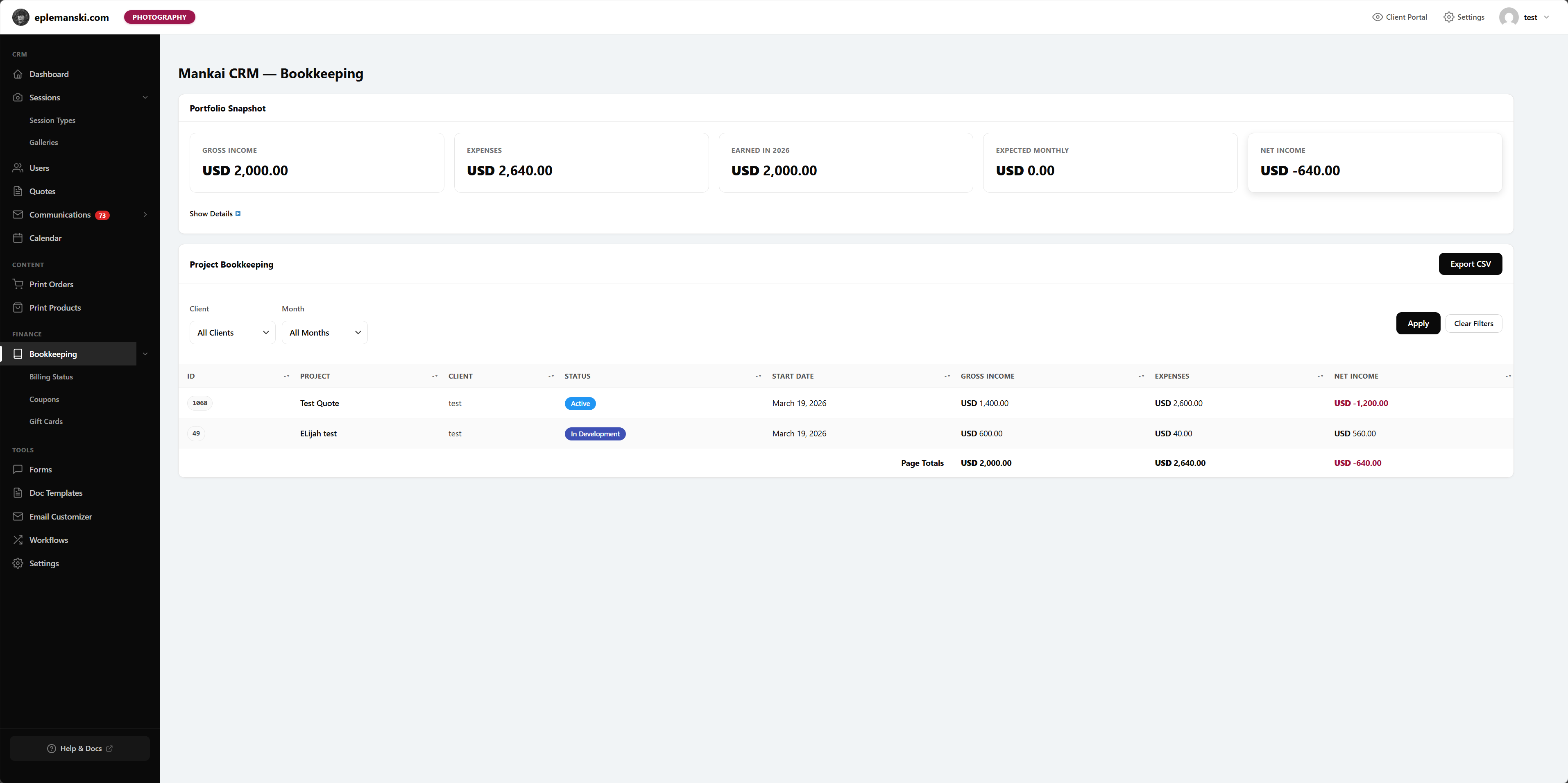
Mankai’s bookkeeping page is an admin reporting surface, not a replacement for full accounting software. It is meant to help you understand project and session finances inside the CRM.
High-Level KPIs
- Gross income
- Expenses
- Earned in the current year
- Expected monthly
- Net income
Portfolio Detail Metrics
- Total projects or sessions
- Active count
- Paid off count
- Overdue count
- Active payment plans
- Total outstanding
- Total contracted
- Average value
- Collection rate
Filtering
You can filter by client and month. This is useful when you want to review only one client’s history or one specific month of work.
CSV Export
The bookkeeping view includes a CSV export button that exports the currently rendered table. That makes it easy to hand filtered results to your accountant or compare numbers against your outside system.
What the Page Calculates
The page reads payment records, completed payment status, balance-affecting flags, totals, outstanding amounts, payment plans, and overdue states to build a clearer picture of portfolio health.
Use It For
- Weekly financial review
- Checking overdue work
- Comparing contracted value to collected revenue
- Exporting filtered records
Try Mankai on your own site
Everything in these docs runs on a $149/yr license. Unlimited clients, your server, your data.
See pricing